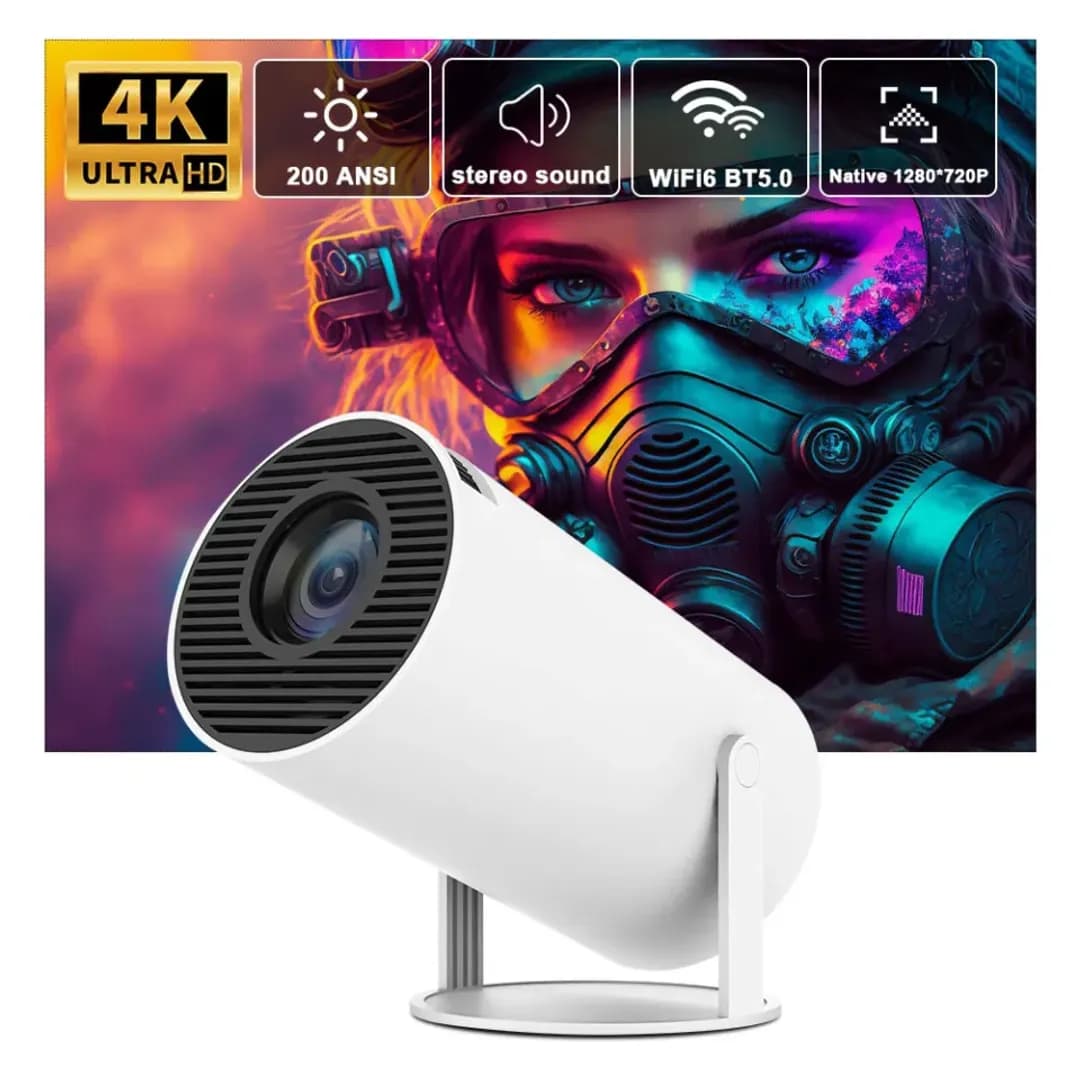
Android Smart Projector HY300 4K (ORIGINAL)
SKU: HY300-ASP-4K-001
Offer Price
৳4800
৳7650
HY300 একটি কমপ্যাক্ট ও পোর্টেবল প্রজেক্টর, যা ঘরে সিনেমা দেখা, ক্লাস/প্রেজেন্টেশন, গেমিং এবং আউটডোর মুভি নাইটের জন্য ব্যবহার করা যায়। ছোট সাইজের কারণে সহজে বহনযোগ্য এবং যেকোনো জায়গায় সেটআপ করা যায়। মূল ফিচারসমূহ: Native 720P HD Resolution: পরিষ্কার ও ভালো মানের ছবি দেখার সুবিধা 5G Wi-Fi Support: ফোন/ল্যাপটপ থেকে সহজে ওয়্যারলেস স্ক্রিন মিররিং Bluetooth 5.0: এক্সটার্নাল স্পিকার বা অডিও ডিভাইস কানেক্ট করা যায় 180° Rotatable Stand: দেয়াল, স্ক্রিন বা সিলিংয়ে প্রজেকশন করা যায় Auto Keystone Correctio
Cash on Delivery
Pay when you receive the product
Fast Delivery
24-72 hours
Easy Return
7 days exchange
Nationwide Shipping
Delivery to every corner
Product Description
HY300 একটি কমপ্যাক্ট ও পোর্টেবল প্রজেক্টর, যা ঘরে সিনেমা দেখা, ক্লাস/প্রেজেন্টেশন, গেমিং এবং আউটডোর মুভি নাইটের জন্য ব্যবহার করা যায়। ছোট সাইজের কারণে সহজে বহনযোগ্য এবং যেকোনো জায়গায় সেটআপ করা যায়।
মূল ফিচারসমূহ:
Native 720P HD Resolution: পরিষ্কার ও ভালো মানের ছবি দেখার সুবিধা
5G Wi-Fi Support: ফোন/ল্যাপটপ থেকে সহজে ওয়্যারলেস স্ক্রিন মিররিং
Bluetooth 5.0: এক্সটার্নাল স্পিকার বা অডিও ডিভাইস কানেক্ট করা যায়
180° Rotatable Stand: দেয়াল, স্ক্রিন বা সিলিংয়ে প্রজেকশন করা যায়
Auto Keystone Correction: প্রজেকশন অ্যাঙ্গেল ঠিক রাখতে সাহায্য করে
Manual Focus: প্রয়োজন অনুযায়ী ছবি শার্প করা যায়
Built-in Speaker: আলাদা স্পিকার ছাড়াই সাউন্ড পাওয়া যায়
Portable Design: বাসা, অফিস, ট্রাভেল বা ক্যাম্পিংয়ে ব্যবহার উপযোগী
ব্যবহার করা যাবে:
মুভি/নাটক/YouTube দেখার জন্য
ক্লাস, ট্রেনিং বা প্রেজেন্টেশনের জন্য
গেমিং ও স্পোর্টস দেখার জন্য
আউটডোর মুভি নাইট বা ক্যাম্পিংয়ের জন্য
ছোট সাইজ, বড় স্ক্রিন এক্সপেরিয়েন্স — HY300 Mini Projector আপনার বিনোদনকে করবে আরও সহজ ও স্মার্ট।
Product Features & Specifications
| Product Type: Smart Projector\ Model: HY300\ Operating System: Android 11 / Android 14 (Depending on Version)\ Processor: Quad-Core ARM Cortex-A53 (Applicable Versions)\ GPU: Mali-G31 (Applicable Versions)\ RAM: 1GB / 2GB (Depending on Version)\ Internal Storage: 8GB / 16GB (Depending on Version)\ Display Technology: LCD TFT\ Native Resolution: 1280 × 720P (Standard HY300 Version)\ Maximum Supported Input: Up to 4K (Depending on Version)\ Brightness: 120–260 ANSI Lumens (Depending on Version)\ Contrast Ratio: Depending on Version\ Aspect Ratio: 16:9 / 4:3\ Projection Size: Approximately 30–130 Inches (Depending on Version and Environment)\ Focus: Manual / Electric (Depending on Version)\ Keystone Correction: Auto / Manual (Depending on Version)\ Wi-Fi: 2.4GHz / Dual-Band 2.4GHz + 5GHz (Depending on Version)\ Bluetooth: Depending on Version\ Speaker: Built-in Speaker\ Ports: HDMI, USB, Audio Out (Depending on Actual Unit)\ Light Source: LED\ Lamp Life: As Specified by the Supplier\ Power Supply: According to the Device Adapter Specifications\ Brand: According to the Actual Device Brand | ### Product Quality & Testing Checklist - Check the projector lens for any stains, dust, or scratches. - Turn on the device and inspect the projected image quality. - Verify that the Focus Adjustment function works properly. - Test the Keystone Correction feature. - Check Wi-Fi and Bluetooth connectivity. - Test the HDMI and USB Ports for proper functionality. - Check the sound quality of the Built-in Speaker. - Ensure that the Remote Control and Power Adapter are working correctly. - Run the projector for an extended period to check for excessive heating or unusual noise. - Verify 4K Input Support and Native Resolution separately to ensure accurate specifications. |
Benefits
- - Enjoy movies and videos on a large screen from the comfort of your home. - Compact and Portable Design for easy storage and transportation. - Android-Based Smart Functionality for convenient entertainment. - Wi-Fi and Bluetooth Connectivity for wireless connections. - HDMI and USB Connectivity for compatible external devices. - Suitable for Home Entertainment and Presentations. - Supports Projection at Different Angles on Compatible Versions.
Usage Instructions
### Usage Instructions
1\. Place the projector on a flat and suitable surface.
2\. Connect the Power Adapter and turn on the device.
3\. Position the projector lens toward a wall or projection screen.
4\. Adjust the Focus and Keystone Correction settings to achieve a clear and properly aligned image.
5\. Connect the projector to the internet using Wi-Fi.
6\. Use the required apps to stream and watch videos or movies.
7\. Connect compatible external devices through HDMI or USB.
8\. After use, turn off the projector, allow it to cool down, and store it in a safe place.