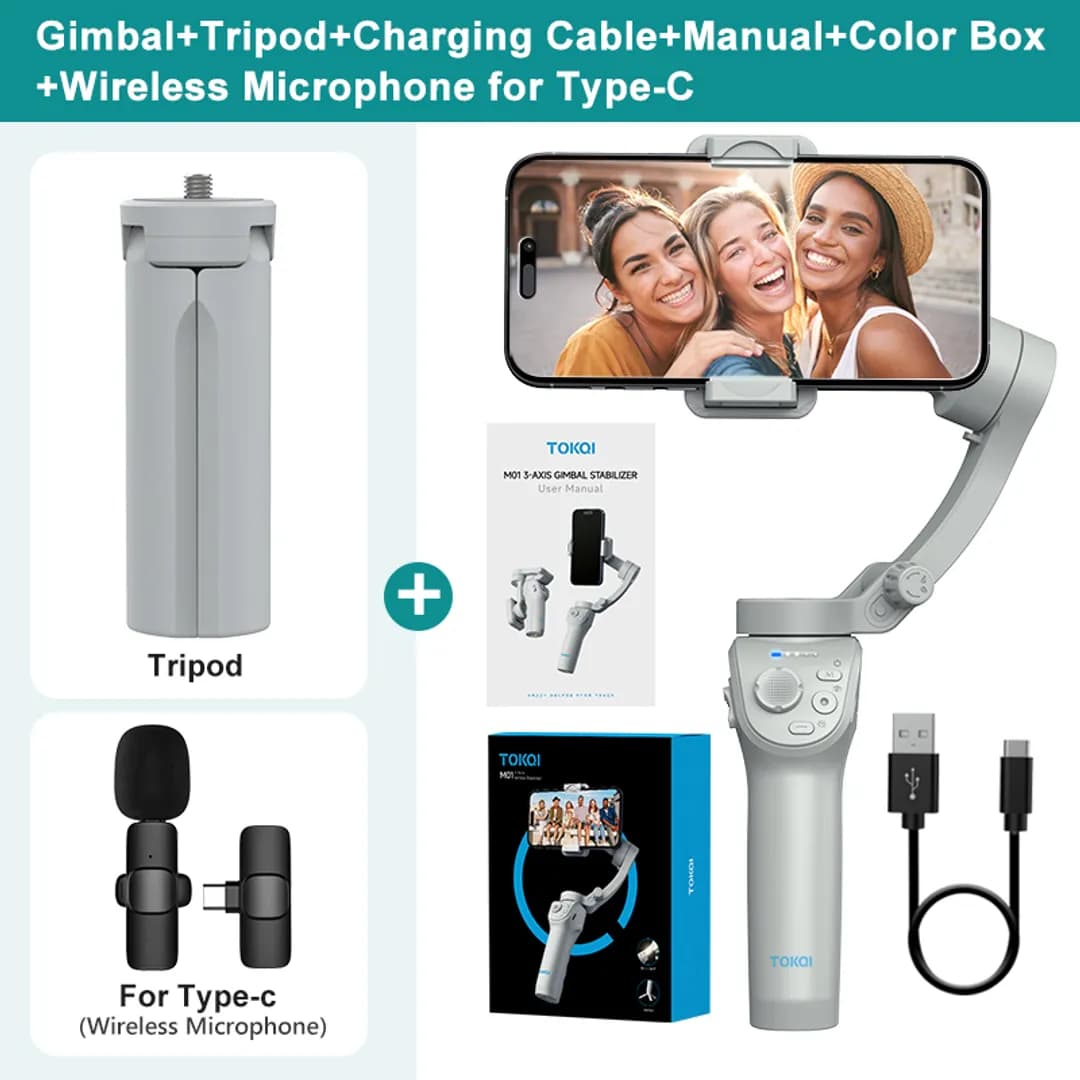
TOKQI M01 Handheld 3-Axis Gimbal
SKU: TOKQI-M01-GMB-001
Offer Price
৳6400
৳8000
TOKQI M01 Handheld 3-Axis Gimbal Phone Holder Anti Shake Video Record Stabilizer for Xiaomi iPhone Cellphone Smartphone Hign-concerned Chemical:None Category:Handheld Gimbals Size:163X119X50mm Hign-concerned Chemical:None Category:Handheld Gimbals Size:163X119X50mm Support Remote Control:No Vertical Shooting:Yes App Setting:Yes Camera Integration:No Charging for Mobile Device:No Max Controllable Speed:120/s Feature:Smile Snapshot,Following the shooting mode,Face Recognition Material:Plastic Pack
Cash on Delivery
Pay when you receive the product
Fast Delivery
24-72 hours
Easy Return
7 days exchange
Nationwide Shipping
Delivery to every corner
Product Description
TOKQI M01 Handheld 3-Axis Gimbal Phone Holder Anti Shake Video Record Stabilizer for Xiaomi iPhone Cellphone Smartphone
Hign-concerned Chemical:None
Category:Handheld Gimbals
Size:163X119X50mm
Hign-concerned Chemical:None
Category:Handheld Gimbals
Size:163X119X50mm
Support Remote Control:No
Vertical Shooting:Yes
App Setting:Yes
Camera Integration:No
Charging for Mobile Device:No
Max Controllable Speed:120/s
Feature:Smile Snapshot,Following the shooting mode,Face Recognition
Material:Plastic
Package:Yes
Weight (g):378
Panning Angle:330
Rolling Angle:320
Titling Angle:330
Configured for:smartphones
of Axes:3-Axis
Communication:bluetooth
Type:handheld gimbal
Brand Name:TOKQI
Origin:Mainland China
Certification:CE
Support mobile phone weight:less than 280g
Support mobile phone thickness:less than 11mm
Support mobile phone width:55-90mm
Product Features & Specifications
| ## Product Specifications | Specification | Details | | ------------------------- | ------------------------------------------------ | | Brand | TOKQI | | Model | M01 | | Product Type | Smartphone Gimbal Stabilizer | | Stabilization | 3-Axis | | Material | PA66 Plastic | | Battery Capacity | 3600mAh | | Working Time | Up to 8 Hours | | Charging Time | Approximately 3 Hours | | Charging Port | USB Type-C | | Charging Input | 5V / 2A | | Bluetooth | Bluetooth 5.2 (According to Model Documentation) | | Mobile App | Gimbal Show | | Android Support | Android 9.0 or Above | | iOS Support | iOS 11 or Above | | Supported Phone Width | 55–90mm | | Supported Phone Thickness | Up to 11mm | | Maximum Phone Weight | Up to 280g | | Face Tracking | Supported | | Object Tracking | Supported | | Gesture Control | Supported | | Fill Light | White / Warm | | Fill Light Brightness | 9 Levels | | Vertical Shooting | Supported | | Horizontal Shooting | Supported | | Tripod Interface | 1/4-inch Standard Screw | | Maximum Control Speed | 120°/s | | Folded Dimensions | 163 × 119 × 50mm | | Net Weight | Approximately 378g | | Each TOKQI M01 Gimbal must be tested before sale to ensure proper functioning of the three stabilization motors, Bluetooth connection, Gimbal Show App pairing, Face/Object Tracking, Gesture Control, Joystick, LED Fill Light, and charging system. Check that the phone clamp and folding joints operate correctly. Before activating the motors, make sure to unlock the Gimbal and properly balance and mount the smartphone. |
Benefits
- - Smooth video recording with 3-Axis Stabilization. - Face and Object Tracking functionality. - Convenient Gesture Control. - Adjustable LED Fill Light. - Supports both Vertical and Horizontal Shooting. - Multiple Creative Shooting Modes. - Foldable and Portable Design. - Ideal for Vlogging and Social Media Content Creation.
Usage Instructions
## How to Use
1. Release the Gimbal's Folded Lock and unfold it properly.
2. Place your smartphone in the Smartphone Clamp and adjust its balance.
3. Press the Power Button to turn on the Gimbal.
4. Install the Gimbal Show App on your smartphone.
5. Enable Bluetooth and connect to the M01 through the app.
6. Select Face Tracking, Object Tracking, or your preferred Shooting Mode.
7. Turn on the LED Fill Light as needed and adjust the brightness level.
8. After recording, turn off the Gimbal, fold it, and store it safely.